Content Gap Analysis for Documentation: Find What Your Docs Couldn't Answer
- Sonat Team
- 11 Aug, 2026
- 08 Mins read
- Documentation Strategy
Every documentation team has the same meeting. Someone asks what we should write next, and the room answers with opinions: the feature we just shipped, the thing support complained about last week, the section that has always felt thin. Everyone is guessing, politely.
Meanwhile, the actual answer is sitting in your help center, unread. Readers have been typing questions into it all month. Some of those questions got an answer. Some didn’t. The ones that didn’t are a ranked, dated, self-updating list of exactly what your documentation is missing — and until recently, almost nobody could see it.
This is a guide to reading that list. What a content gap actually is, why page analytics structurally cannot find one, why “unanswered” is really four different problems with four different fixes, and how to turn the whole thing into a weekly routine rather than a quarterly audit.
What a content gap actually is
A content gap is a question your readers asked that your documentation could not answer.
That definition is narrower than the one you usually see, and the narrowness is the point. A gap is not a page with low traffic. It is not a section you feel guilty about. It is demand you can observe, with no supply behind it: a specific person, at a specific moment, wanted a specific thing from your documentation and left without it.
That makes it the only content signal that is already prioritized for you. Nobody has to decide whether the topic matters. Twenty-three people asking the same question in a month have decided.
Why page analytics can’t find gaps
The reason gap analysis is hard has nothing to do with tooling budgets. It’s structural.
Web analytics measures pages. It can tell you a page was viewed four thousand times, that people bounce off it in nine seconds, that nobody scrolls past the second heading. All of that is useful, and all of it is about content you have already written.
A content gap is content you have not written. There is no page to attach a number to. If a hundred readers this month wanted to know whether your product works with a specific integration and you have never documented it, your analytics dashboard shows you nothing at all — not a zero, not a warning, nothing. The demand is invisible because the measurement is attached to supply.
This is why documentation teams fall back on proxies:
- Support tickets. The best proxy available, but it is filtered to the people motivated enough to open a ticket. Most readers who fail to find an answer just leave. Ticket volume shows you the tip, sized by how annoying it was to contact you.
- Zero-result searches. Genuinely useful, and free — but a keyword search returns “no results” only when the words match nothing. A reader searching “billing” gets ten results and still doesn’t find the one thing they wanted. That failure is invisible to search analytics.
- Asking your support team. Fast, cheap, and worth doing. It is also memory rather than measurement, and memory is weighted toward last week and toward whoever speaks up in the meeting.
Each of these narrows a wide problem to the slice it can see. None of them counts the reader who asked a full question, got a plausible-looking non-answer, and closed the tab.
What AI search changed
The interesting side effect of putting an AI answer engine on a help center is not the answers. It’s the questions.
Keyword search gives you fragments — “reset”, “error E4”, “pricing”. You can’t tell from those what someone actually wanted. When readers ask an AI, they write sentences: how do I factory reset the thermostat, what does error code E4 mean, does this work with a heat pump. That’s a requirement, in the reader’s own words.
And unlike a keyword search, an AI answer has an outcome. The engine either answered from your content or it didn’t. That yes/no is the missing half of the signal. Questions on their own are interesting; questions plus outcomes are a work queue.
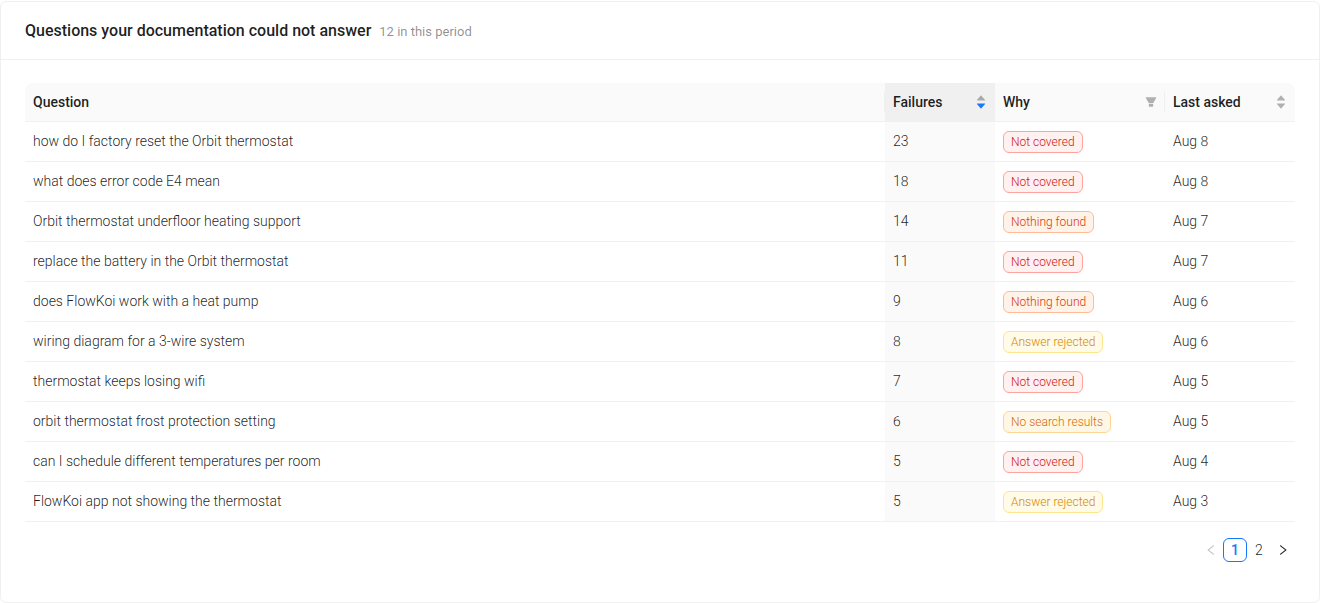
This is what Sonat AI Insights records: every question readers asked your documentation, whether it was answered, and — for the ones that failed — the reason why.
“Unanswered” is not one problem
Here is where most gap reports stop being useful. A flat list of failed questions tells you something is wrong. It does not tell you what to do, and the right response is genuinely different depending on how the question failed.
Sonat tags every gap with the cause. There are four, and each one is an instruction:
| The gap says | What happened | What to do about it |
|---|---|---|
| Not covered | The engine retrieved related topics and still could not answer from them | A real content gap. The subject sits next to something you’ve written, but the specific answer isn’t in it. Write the topic. |
| Nothing found | Retrieval came back completely empty | Either nothing covers this at all, or the content exists and isn’t indexed. Check indexing before you write twenty topics. |
| No search results | A plain site search for the question matched nothing | Coverage or vocabulary. Sometimes the topic exists but uses your internal wording rather than your readers’. |
| Answer rejected | The AI answered and the reader marked it unhelpful | The topic almost certainly exists and is wrong, stale, or unclear. Find and fix it — don’t write a duplicate. |
Look at the difference between the first and the last row. “Not covered” is a writing job. “Answer rejected” is an editing job on a page you already have — and if you treat it as a writing job, you publish a second article on a subject where the problem was that the first one was wrong. Now you have two.
The distinction also changes what you conclude at the portfolio level. If most of your gaps are Nothing found, you probably have an indexing or publishing problem, not a content problem — and a month of writing would have fixed none of it. If most are Not covered, you have a genuine backlog and you now know its running order. If a cluster of Answer rejected rows all point at the same area, something in that area changed and the docs didn’t.
That is the difference between a report that says you failed 118 times and one that says write these six topics, fix these two, and check why this section isn’t indexed.
Reading the numbers without fooling yourself
The report leads with one number: the count of questions your documentation could not answer. Not seven tiles — one number, because that’s the one you can act on.

Two things are worth knowing about how to read the rest.
The trend is stacked, not two lines. Answered and unanswered questions are drawn as one bar per day, so the height is that day’s volume and the band on top is the gap. Two separate lines let a quiet week look like an improvement — traffic drops, unanswered drops, everyone congratulates themselves. A stacked bar makes a quiet week look like a quiet week.
Answer rate is a ratio, and ratios move for boring reasons. A launch brings a wave of new-user questions and your rate dips; that’s the product working, not the docs failing. Read the absolute count of failures alongside it, and read the reason mix. A rising failure count made entirely of Not covered rows about a feature you shipped last Tuesday is a normal, healthy, temporary thing.
Turning it into a routine
Gap analysis fails as a quarterly project and works as a weekly habit. It takes about twenty minutes.
- Open the report for the last 7 days. Not 90. A 90-day view is for planning; a 7-day view is for noticing that something broke on Tuesday.
- Read the top ten by failure count. Frequency is the prioritization — you don’t need a scoring rubric on top of it.
- Sort by cause, not by topic. Do all the Answer rejected rows first: they’re edits to pages you already have, they’re fast, and a wrong page costs more than a missing one. Then the Not covered rows, which are your writing queue. Then check whether the Nothing found rows share a document — that’s an indexing check, not a writing task.
- Watch for repeats. “Reset password” and “how do I reset my password” are two rows today. Grouping near-duplicate questions into themes is on our roadmap; until it lands, read the table with an eye for the same question wearing three different coats.
- Check back after you publish. The question either stops failing or it doesn’t. If it keeps failing after you’ve written the topic, the topic isn’t answering it — which is a much more interesting problem, and one you’d never have found.
Also read the cited topics table while you’re there. Those are the pages your AI answers actually lean on — the ones doing the work. They’re the highest-leverage pages you own, and the ones where a quiet inaccuracy propagates into every answer that cites them. In Sonat each row links straight into the editor, so fixing one is two clicks from noticing it.
Closing the loop with an agent
The gap report isn’t only a page. It’s also a set of tools on the Sonat MCP Server, which means an assistant like Claude can read it directly.
That makes the whole loop something you can hand off:
- The agent reads the content gap list.
- For each gap, it searches your knowledge base to check whether anything already covers it — which quietly resolves the “is this a new topic or an edit?” question.
- It drafts the topic in your structure, in your style, using your existing terminology.
- A person reviews and approves the publish.
The agent proposes; your team decides. Nothing goes live unread. But the part of documentation work that is genuinely tedious — noticing the gap, checking for duplicates, producing a first draft — stops being the reason it doesn’t get done.
An AI that reads your content is now table stakes. An AI that can see what your content missed, and fix it, is a different thing.
What the report can’t tell you
Any dashboard loses its credibility the first time someone checks it against something they already know. So, the edges:
- Short queries never reach the AI. Searches under three words are treated as keyword lookups and don’t trigger an AI answer, so they never show up as AI gaps. The report covers questions asked in sentences — which are the harder ones, but not all of them.
- Near-duplicate questions are separate rows today, as above.
- The embeddable assistant widget isn’t counted yet. Questions asked in your published manuals and through the MCP server are.
- “Support time saved” is an estimate and says so on screen. It multiplies answered questions by fifteen minutes, roughly the time it takes to read and reply to a written request. We can’t know whether a reader who got an answer would otherwise have opened a ticket, so treat it as a sense of scale, not a measured saving.
None of these change the core of it: the questions are real, the outcomes are recorded by the engine rather than inferred from text, and the ranking is done by your readers.
Start with the questions you already have
If you take one thing from this: stop deciding what to document in a meeting. The list already exists. It is ranked by frequency, dated, written in your readers’ own words, and it updates itself every day.
AI Insights is available on the Business plan and above, under Analytics → AI Insights, for a single manual or across your whole account. Search analytics — query volume, top searches and zero-result searches — is on every plan, including Free.
See what AI Insights shows, or open your own report and read the top ten. The first one usually explains a support queue.
Related Articles

The Best Google Docs Alternative for Documentation Teams
Picture this: it's the 70s and 80s, and the world is just getting a taste of what typing on a computer could be like. No more typewriters, just basic text…

Develop a Comprehensive Documentation Plan: A Step-by-Step Guide
In the field of project management, effective communication and collaboration are important. Documentation stands at the core of these essentials, acting as…

Advanced Documentation Review Techniques
In today's world, being quick and smart about going through tons of documents is key to winning lots of jobs. Think about lawyers diving into cases or tech…

